Mixed-reality applications work well when the headset only needs to understand the room around the user. The problem gets harder when a physical object needs to become part of the experience.
A steering wheel in a driving simulator, for example, needs to remain aligned with its virtual counterpart as it moves. The same is true for a tool used in training, an instrument in a research environment or a physical mockup used during an automotive design review. If tracking drifts or loses the object, the virtual model no longer lines up with what the user is touching.
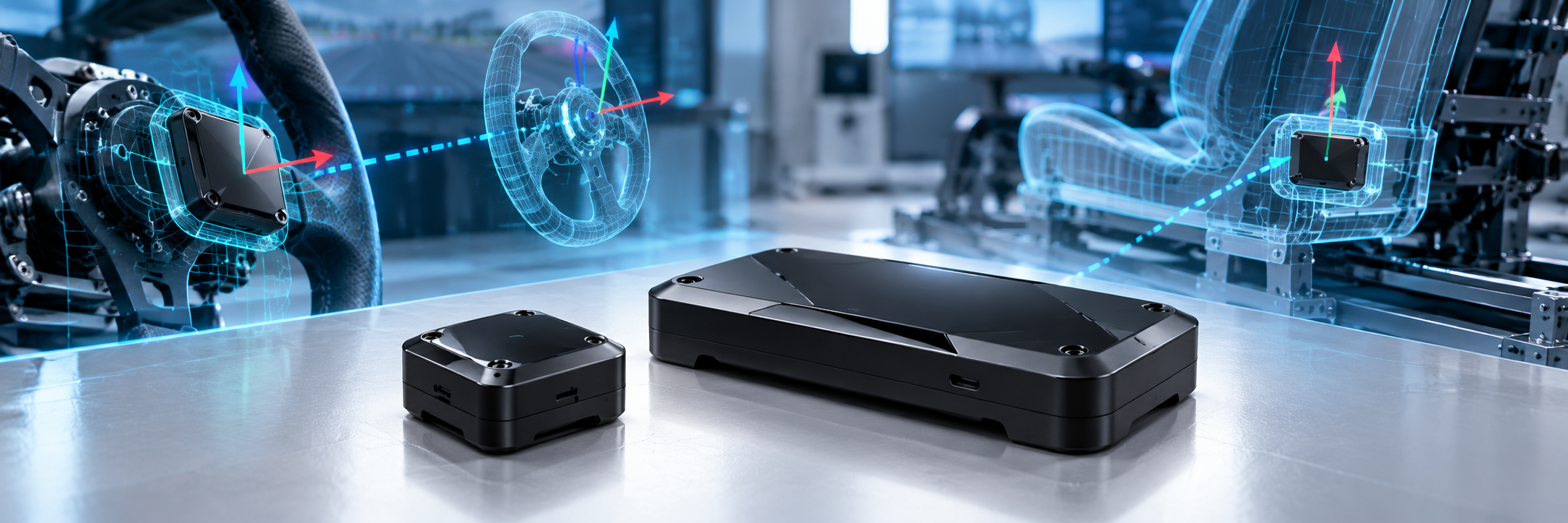
MIKROE is addressing that problem with its Spatial Anchor S1 and Spatial Anchor R1, two hardware trackers designed to bring physical objects into applications running on Apple Vision Pro.
The devices are now shipping alongside MIKROE’s Spatial Anchor Demo app and supporting documentation.
Giving Vision Pro Something to Track
Rather than relying entirely on the visual appearance of an object, the Spatial Anchors give Vision Pro a defined hardware target.
The modules combine infrared optical tracking, inertial sensing and low-latency wireless communication in a self-contained device that attaches directly to a physical object. The combination gives a visionOS application information about the object’s position and orientation as it moves.
Developers can then associate a 3D model with the tracked object. MIKROE’s demo application provides a starting point for pairing an anchor, confirming tracking and positioning a virtual model relative to the physical hardware.
That means a developer building a simulator or immersive engineering application does not have to start by designing a custom tracking system simply to bring a physical control, tool or mockup into the virtual environment.
Two Trackers for Different Objects
The Spatial Anchor S1 is the smaller option and is intended for objects used relatively close to the wearer. MIKROE points to steering wheels and joysticks as examples, along with other compact controls or tools that need to remain visible to the tracking system without adding significant bulk.
The larger Spatial Anchor R1 is designed for bigger objects and installations where the tracker needs to remain visible across a wider range of viewing angles and distances. Potential applications include automotive bucks, flight simulators and other large rigs.
Both devices use the same basic approach: attach the tracker to an object, pair it over Bluetooth and let the visionOS application establish the relationship between the physical object and its virtual representation.
From Virtual Model to Physical Interaction
The distinction matters for engineering applications because spatial computing becomes much more useful when virtual content lines up with something the user can physically touch.
An automotive design team, for example, might use a real seating buck and controls while displaying the rest of a vehicle virtually. A flight simulator could preserve physical controls while changing the cockpit or environment around them. Training systems could associate digital instructions with a real tool as it moves through a task.
MIKROE is already seeing that idea move into engineering software. Innoactive Spatial has added support for the S1 and R1, allowing physical elements such as seating bucks to be positioned relative to virtual models during immersive design reviews.
Why It Matters
Vision Pro already provides sophisticated spatial tracking, but engineering applications introduce another requirement: the system needs to understand not only the user’s surroundings but also which specific physical object is moving and where it is located.
The Spatial Anchor platform gives developers a packaged hardware approach to establishing that relationship.
For applications involving digital twins, simulation, training or immersive design reviews, that creates a bridge between fully virtual content and the physical equipment engineers still need to see, hold or operate.
The Spatial Anchor S1 and Spatial Anchor R1 are shipping now, along with MIKROE’s Spatial Anchor Demo app and setup documentation. Additional product information, documentation and purchasing options are available through MIKROE.